
LEAP™5 Premium - Email Broadcast Manager
The email broadcast manager is available in LEAP™5 Premium, as a paid Extension to LEAP, or as a Stand-Alone Application. It allows you to integrate email out from your website, sending recipients back to your site and tracking the progress along the way. This creates a branded wrap-around experience from the moment your recipients receive your email, through to their follow up on your site, and any potential sales or services that arise as a result.
Login
If you have a LEAP™5 website your e-broadcast application will use the same login. Choose the ebroadcast option from the Apps list in the LEAP toolbar, OR, add /lasso9/emailbroadcast/ to your domain url. eg http://www.yourdomainname.com/lasso9/emailbroadcast/
You will then be asked to authenticate your login and password.
Set up Email Broadcast Defaults
Configure your email broadcast sending address and SMTP Server settings using the Defaults section.
Outbound SMTP: enter the name of the mail server you are sending through eg. mail.example.com
Port: specify the Port on the mail server that will be used for these emails
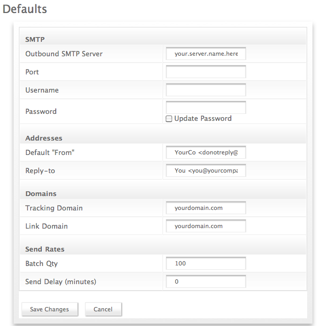
Username and Password: In order to be able to send, your Email Broadcast needs to have a username and password that are valid and accepted by your mail server.
Set up your Send and Reply Addresses
Default "From": Entre the valid email address that you want recipients to see upir email coming from when its in their inbox
Reply to: Use the valid contact email address for the individual (or group) who will handle any questions or enquiries from the e-broadcast
Set up your Domains
Tracking Domain: The domain where you will be storing the data results of the e-broadcast sending and opens
Link Domain: The domain that will serve the links contained in the e-broadcast
Send Rates
Batch Quantity: Specify your Send Rates to match your mail servers given load and performance capability - your company won't thank you if you bring their email to a halt by attempting to sending thousands of emails through one funnel. Batching into sets of between 25 and 175 also reduces the risk of your valid business emails being flagged as 'spamming' by sending too many at once.
Send Delay: This is a useful tool that allows a 'cooling off' or final review before the email is sent and forever beyond your control. A delay of 5-10 minutes allows sufficient time for nagging doubts about content or recipients to be thought through.
Manage Lists
In the Manage Lists section you have the overview of the email lists created.
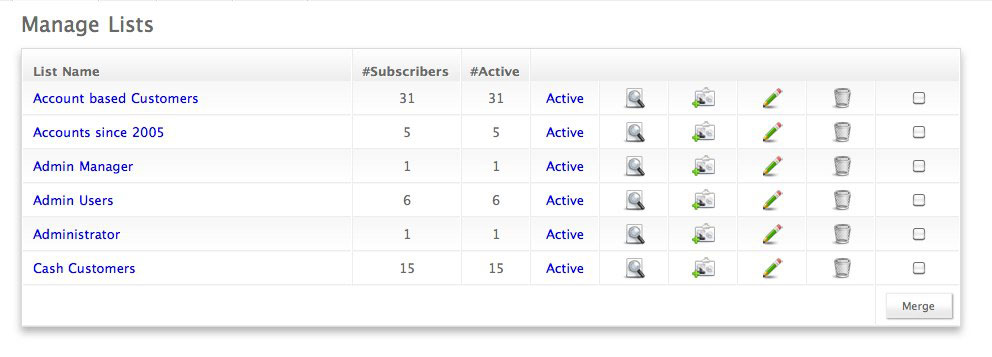
- Each named list has it's own set of assigned emails.
- A single user email can be a member of multiple named lists eg. Clients since 2005, Clients in Toronto area,
- When you send a broadcast email to multiple lists, the send process detects duplicate sender addresses and filters these out, so you only send one of each email to each recipients.
List Details
Each list shows the number of Subscribers and of those the number Active. You can View the list, and Add, or Edit the members of the list.
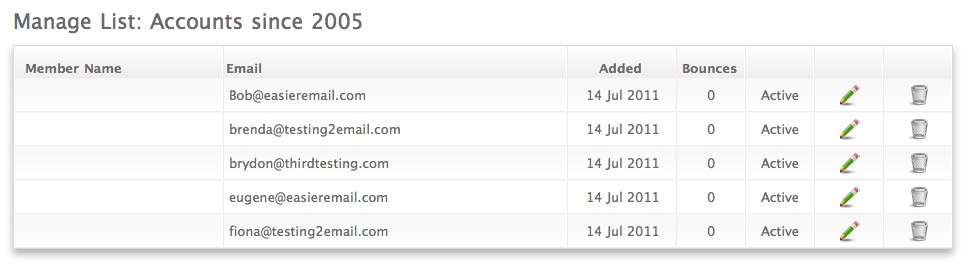
Adding Contacts
- You can import contacts into your list by browsing to your local files, and choosing the csv or txt file that you want to upload.
- You can manually enter additional contacts.
Set up Email Campaigns
A campaign is set up using the following steps:
Create a Name for your internal management, and a Subject that your recipients will see when they receive your campaign in their email.
Content can be added in the Text box, for plain text emails, and in the HTML area for full graphical delivery. You can choose to send BOTH formats so where an individual has their mail set to reject incoming mail with HTML they will still receive the plain text version.
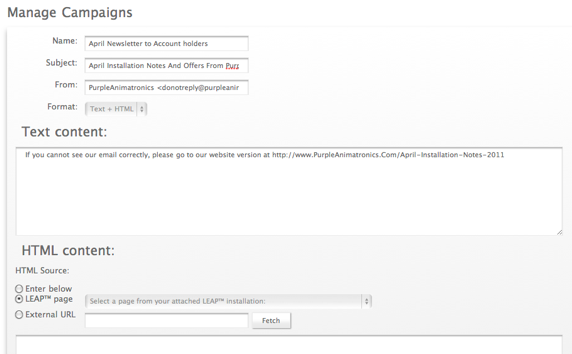
HTML has three configurations available:
- Enter directly
- Use a LEAP™ page
- Fetch HTML from an external URL.